Free Alternatives for Sticker-Making Apps | Tool Comparison
Popular photo-to-sticker services go offline sometimes. Canva, remove.bg and LINE Sticker Maker compared — plus a free bulk-processing alternative.
Table of Contents
Looking for an Alternative Sticker Tool
Some popular photo-to-sticker services, like Tukusuta, have gone offline temporarily, leaving users searching for a replacement workflow.
](/assets/images/guides/tsukusuta-suspended-notice.webp)
This guide compares the major LINE sticker creation tools and shows how EzStampify covers the same bulk photo-to-sticker workflow, entirely free and browser-based.
Comparing the Major Sticker Creation Tools
Each tool has a different strength. Here's how they compare.
LINE Sticker Maker (Official)
The official app from LINE covers creation through submission end-to-end, with the highest trust factor. However, it's mobile-app centric and less suited to bulk-processing many images at once.
A common workflow is prepping images (background removal, splitting, resizing) in EzStampify first, then finishing the submission in the official app.
Canva
A full-featured design tool with rich templates, great for stylized single stickers. But batch-processing dozens of AI-generated illustrations (background removal, splitting, resizing) is more tedious than with a dedicated tool.
remove.bg
A well-known background removal specialist. Great single-image quality, but the free tier limits resolution and doesn't handle LINE's required sizing or bulk splitting.
Indie 'Stamp Cutter' Tools
Niche tools focused specifically on cutting out AI-generated illustrations. Useful, but usually lack an all-in-one flow covering transparency, text, and batch ZIP export.
](/assets/images/guides/line-stamp-cutter-features.webp)
Splitora (iPhone App)
An iPhone-only app covering splitting, background removal, cropping, and resizing in one bulk workflow. Like EzStampify, it processes on-device and supports batch processing, but it's iPhone-only — no PC or Android support, and it requires an App Store install first.
EzStampify runs entirely in the browser, so it works instantly on PC, Android, or iPhone with no install required — a straightforward option if you're not on iPhone.
Why EzStampify Works as a Drop-In Replacement
If you liked the simplicity of turning your own photos into stickers quickly, EzStampify replicates that experience while adding bulk processing.
Bulk Photo-to-Sticker Processing, Entirely in Your Browser
Background removal, margin trimming, LINE-compliant resizing, grid splitting, text overlay, and batch ZIP export — all with no sign-up and no install.
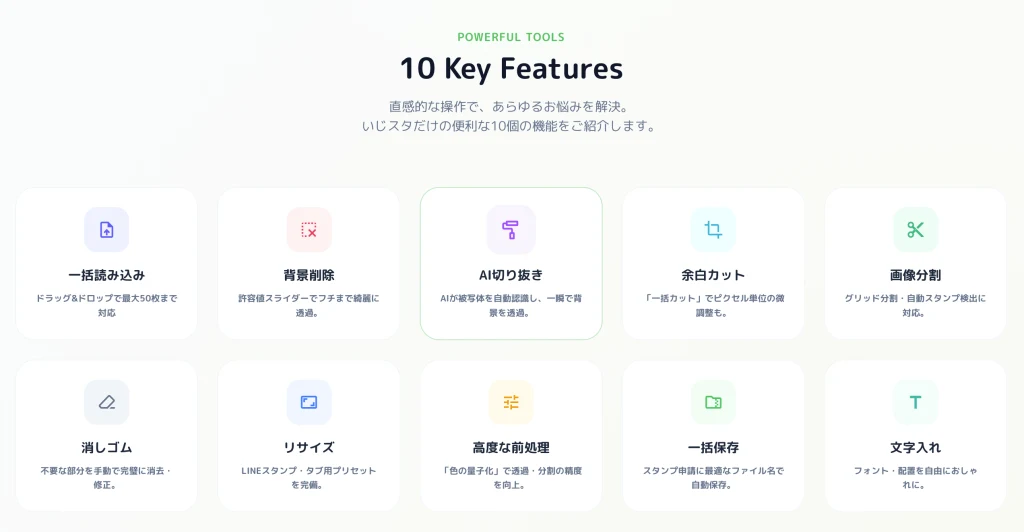
Process Many Images at Once
Load a whole folder of photos and resize, split, and rename them in one pass — ideal for a full 40-sticker set.
A Simple Migration Path
1. Load your images into EzStampify in bulk.
2. Remove backgrounds and trim margins with AI removal.
3. Resize using the LINE sticker presets.
4. Add text if needed.
5. Export as ZIP with submission-ready filenames.
Summary: Pick the Right Tool for the Job
Canva for design-heavy stickers, remove.bg for one-off background removal, the official app for trusted submission — and EzStampify for bulk, photo-based sticker creation, free and browser-based.